A very simple R data pipeline framework. {workr} provides a minimal mental model for describing and executing step-by-step workflows. These simple workflows can be combined into configurable data pipelines that can automate large tasks.
What is {workr}?
{workr} was built to solve a specific problem: reusable, customizable data pipelines for complex clinical trial monitoring.
The core functions in {workr} were originally developed as part of the {gsm} framework for risk-based quality monitoring (RBQM). The {gsm} team developed a stable, reusable model for generating metrics to monitor clinical trials.
Our challenge was figuring out how to run those metrics across a large portfolio.
Take 30 studies with monthly snapshots, each needing 15 metrics computed in 5 steps, and you get 27,000 computations per year. Each study also has slightly different requirements, so maintaining individual scripts quickly becomes a massive pain.
{workr}’s solution: Define workflows once, track customizations in YAML files, and compose them into larger pipelines.
The original gsm::RunWorkflow functions were developed in a few hours and were seen as a stopgap until we picked a “real” pipeline.
The approach has proven to be surprisingly stable and flexible. So much so that we’ve created {workr} and started using it outside of our {gsm} pipelines.
{workr} workflows
{workr} workflows are list objects that are typically defined in yaml files. Each workflow has the following components:
- Steps are functions that accept data and parameters, producing output that gets added to the shared data list
- Meta is workflow-level configuration accessible to all steps
- Spec optional data specification defining expected input data for the workflow.
The package provides three core functions for running workflows:
-
workr::RunStep()- execute a single workflow step -
workr::RunWorkflow()- execute a workflow specification (YAML) -
workr::RunWorkflows()- run multiple workflows in sequence
Sample Workflow
Define a workflow in YAML:
# hello_cars.yaml
meta:
  ID: hello_cars
  col: speed
steps:
  - name: dplyr::pull
    output: speed
    params:
      df: df
      col: col
  - name: mean
    output: result
    params:
      lData: speed
Run it from R:
wf <- yaml::read_yaml("hello_cars.yaml")
lData <- list(df = cars)

result <- workr::RunWorkflow(
  lWorkflow = wf,
  lData = lData
)

# result = 15.4 (mean of cars$speed)
Each step in a workflow:
- Calls a function (specified by
step$name) - Passes parameters from
params(resolving references tolData,meta, or literal values) - Saves the result to
lDatausing theoutputname - Makes it available for the next step
That’s it! By chaining steps (and even whole workflows) together, you can build complex pipelines from simple, reusable components.
Configured Data Loading
RunWorkflow() and RunWorkflows() support configurable LoadData hooks. You can supply either a function or the name of a registered provider through lConfig$LoadData.
{workr} includes a built-in "gsm.datasim" provider for generating workflow inputs from the optional {gsm.datasim} package.
The workflow should reference the objects generated by {gsm.datasim}. For example, this YAML summarizes enrolled subjects by simulated site from Raw_SUBJ:
# simulated_subjects.yaml
meta:
  Type: Example
  ID: simulated_subjects
steps:
  - output: enrolled_subjects_by_site
    name: workr::RunQuery
    params:
      df: Raw_SUBJ
      strQuery: >
        SELECT
          invid AS site_id,
          COUNT(*) AS enrolled_subjects,
          AVG(timeonstudy) AS mean_time_on_study
        FROM df
        WHERE enrollyn = 'Y'
        GROUP BY invid
        ORDER BY enrolled_subjects DESC
Then configure RunWorkflow() to load the simulated study data before the first step runs:
wf <- yaml::read_yaml("simulated_subjects.yaml")

site_summary <- workr::RunWorkflow(
  lWorkflow = wf,
  lConfig = list(
    LoadData = "gsm.datasim",
    gsm.datasim = list(
      profile = "standard",
      study_type = "standard",
      participants = 250,
      sites = 25,
      snapshot_count = 1
    )
  )
)
The provider reads its options from lConfig$gsm.datasim. Common fields include profile, study_type, participants, sites, snapshot_count, months_duration, and snapshot. Generated Raw_* objects, such as Raw_SUBJ and Raw_AE, are also exposed as df* aliases, such as dfSUBJ and dfAE, for compatibility with existing workflows.
For more detail on configurable load and save hooks, including the built-in "gsm.datasim" provider, see the Load and Save Hooks vignette.
Combining Workflows
{workr} workflows are designed to be chained together. The output of one workflow becomes the input for the next. {workr} provides several tools to support this functionality.
workr::RunWorkflows calls multiple workflows
While workr::RunWorkflow runs all the steps in a single workflow, workr::RunWorkflows (with an s) runs multiple workflows one after the other. Just pass a list of workflows. A few details: - workr::RunWorkflows() still takes a single lData object as input, each workflow makes its updates, and then the updated lData object is passed along to the next workflow. - workr::MakeWorkflowList() is an easy way to read a whole folder of YAML workflows into the format expected for workr::RunWorkflows(). - workr::MakeWorkflowList() reorders workflows based on meta$priority, so if you need things to run in a certain order, make sure to set that parameter. If nothing is provided, priority is set to 0.
workr::RunProject calls multiple sets of workflows
Use workr::RunProject() when a project is split into phases. Each immediate subdirectory is one phase, and each phase is run with workr::RunWorkflows(). Without config files, each phase’s outputs are carried forward to the next phase as a flat named list.
# Project directory structure:
# project/
#   01_mapping/
#     ae.yaml
#     lb.yaml
#   02_analysis/
#     kri.yaml

results <- workr::RunProject(
  strPath = "project",
  lData = list(raw_data = my_data)
)
# Runs 01_mapping workflows first, then 02_analysis
# Outputs from 01_mapping are available as inputs to 02_analysis
Key options:
-
strPhases— run a subset of phases, or control their order -
bReturnResult/bKeepInputData— passed through toRunWorkflows() -
bContinueOnError— record workflow failures and keep running; the default keeps the existing fail-fast behavior fromRunWorkflows() -
bRecursive— passed through toMakeWorkflowList()
Phases are sorted alphabetically by default (use numeric prefixes like 01_, 02_ to control order).
lConfig can also control load/save hooks at different levels. Top-level LoadData and SaveData are passed to RunWorkflows() for each phase, so they run for each workflow in that phase. lConfig$phases[["phase_name"]] applies hooks to one phase, and lConfig$project$LoadData or lConfig$project$SaveData runs once before or after the full project.
For snapshot branches, the manifest step usually creates manifest.csv, rproject.toml, and a workflows/ directory. Pass that workflows/ directory to RunProject().
Phase folders can include _config.yaml when the default carry-forward behavior is too broad. Use input to choose what the phase receives, and output to shape what later phases see.
# workflows/3_reporting/_config.yaml
input:
  from_phases: [1_mappings]
  from_results:
    lAnalyzed: 2_metrics
  include_workflows:
    from_phase: 2_metrics
  extra:
    dSnapshotDate: "2026-06-09"
output:
  wrap_as: lReports
  transform: null
In this example, reporting receives mapping data, metrics results as lAnalyzed, the metrics workflow definitions, and a snapshot date. The reporting output is stored as lReports.
workr::Manifest — Reproducible Package Environments
One nice thing about {workr} workflows is that they can be combined across packages. To support this, {workr} includes tooling for creating reproducible manifests — versioned snapshots of packages and their workflows at a point in time.
pkgManifest() resolves a list of GitHub packages to specific versions and generates:
-
manifest.csv— pinned package versions with SHAs -
rproject.toml— rv-compatible dependency file -
workflows/— merged workflow YAML files pulled from each package’sinst/workflow/
Package manifests are stored on orphan branches (prefixed ss-* for “snapshot-source”) and updated nightly via GitHub Actions. These branches serve as the source of truth for reproducible package environments.
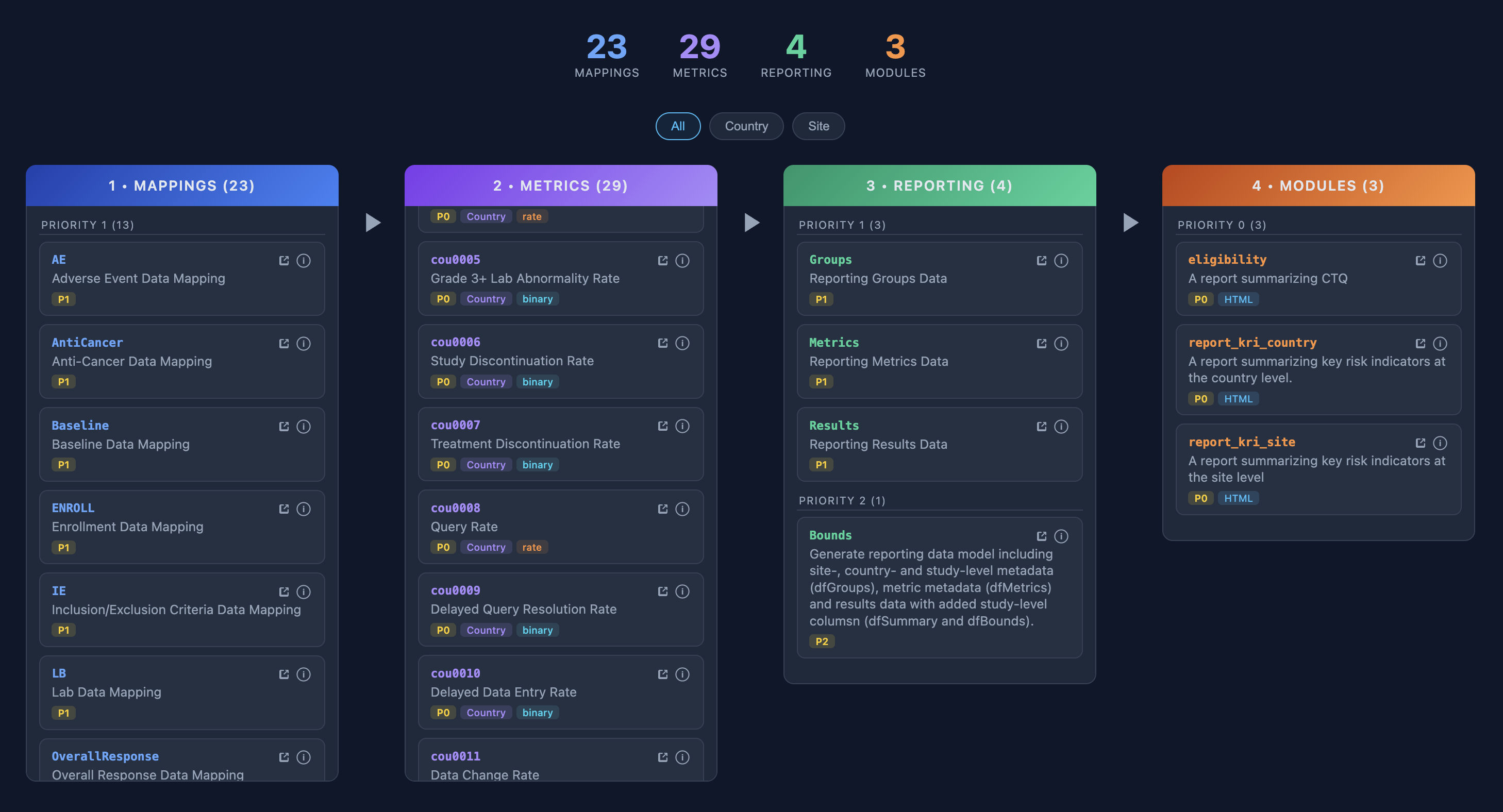
📦 Demo snapshot (ss-demo) — gsm.core, gsm.mapping, gsm.kri, gsm.reporting
Visualizing Workflows
YAML workflows can be a little hard to follow, especially when you’re running a few (or more than a few) in a row, so we’ve created some tools to help visualize and track workflows.
{workr} Shiny app
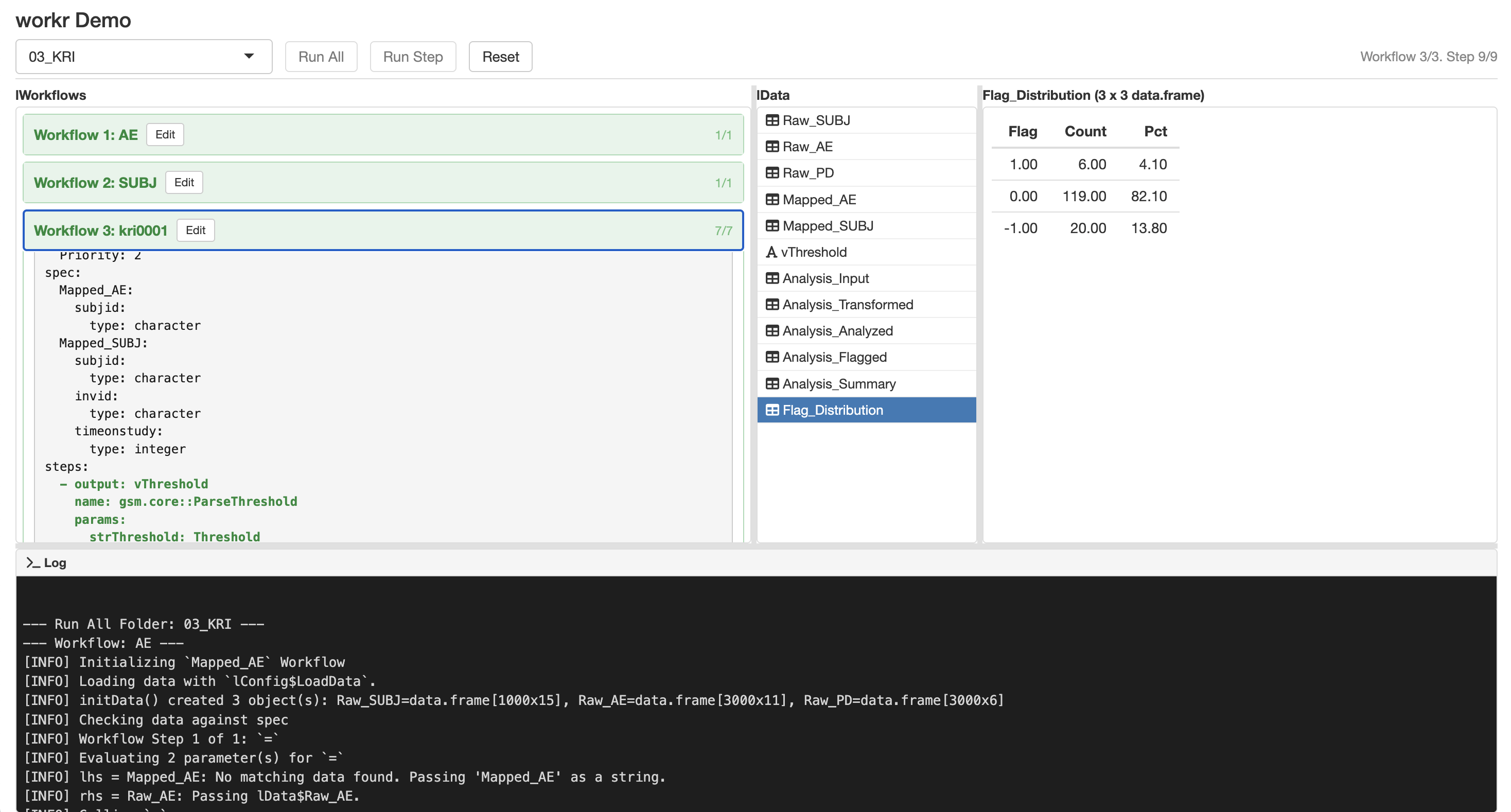
workr::DemoApp_init() launches a simple Shiny app application that lets you explore and run workflows in real time. A hosted version is available at jwildfire.shinyapps.io/workr-demoapp.
Note: The hosted app includes only the basic workflow examples (
01_RunWorkflowand02_RunWorkflows) to stay within shinyapps.io memory limits. Runworkr::DemoApp_init()locally to explore all examples, including the KRI and data transformation workflows.
Automation via GitHub Actions
We provide several GitHub Actions to automate snapshot creation and site deployment.
| Workflow | Trigger | Purpose |
|---|---|---|
manifest.yaml |
Reusable / manual | Resolve packages and generate manifest artifacts on an orphan ss-* branch |
nightly-manifest.yaml |
Cron (2am UTC) / manual | Runs manifest.yaml for configured manifest branches |
pkgdown-with-examples.yaml |
Push to main/dev / PR / manual | Build pkgdown site with examples and slides |
pkgdown-cleanup.yaml |
PR close | Remove PR preview deployments from gh-pages |
R-CMD-check.yaml |
Push to main / PR | Standard R CMD check |
R-CMD-check-dev.yaml |
Push to dev / PR | R CMD check against dev dependencies |
qcthat.yaml |
PR / release / issue-close / manual | Generate issue-test coverage + UAT reports and fail on uncovered completed issues |
r-releaser-caller.yaml |
Manual | Release automation via r-releaser |